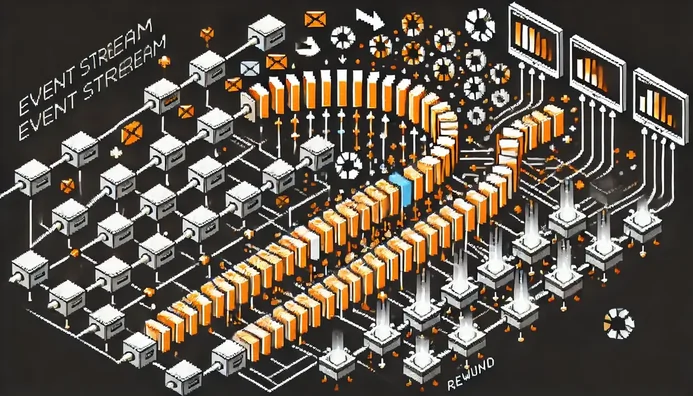
Azure event hubs is designed to enable event re-processing via its event retention and checkpointing principles.
Azure event hubs is designed to enable event re-processing via its [event retention](https://learn.microsoft.com/en-us/azure/event-hubs/event-hubs-features#event-retention) and [checkpointing](https://learn.microsoft.com/en-us/azure/event-hubs/event-hubs-features#checkpointing) principles.
In this post, we will discuss the checkpoint concept and methods to rewind the event stream.
**Full working sample** [is available on Github as usual, referred to in this post as 'our sample'](https://github.com/MissaouiChedy/BlogSamples/tree/main/AzureEventhubsCheckpointsRewinding)
## Event Hubs Checkpoints
When consuming events from event hub, we provide a storage blob that is used as a checkpoint store.
The checkpoint store is simply a cursor used by consumers to mark *where are we at* in the event stream with respect to the consumer group and the current partition.
When the consumer restarts, it will rely on the checkpoint store to know the last consumed event from where to start
the processing.
Consider the following, event stream:
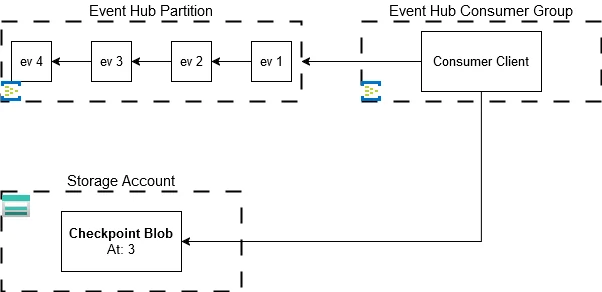
Suppose here that the *Consumer Client* just started, it will read from the checkpoint store that processing should start at *ev 3* and will proceed accordingly.
When using the [`EventProcessorClient`](https://learn.microsoft.com/en-us/dotnet/api/azure.messaging.eventhubs.eventprocessorclient?view=azure-dotnet), the `ProcessEventArgs` class representing an event received for processing provides the `UpdateCheckpointAsync` method, which **must be called explicitly to update the checkpoint store.**
Using this method, we don't have to fiddle with the checkpoint blob directly to update the checkpoint store.
### Blob Checkpoint Store Structure
Taking a look at the checkpoint store container, we can observe that it is structured as following:
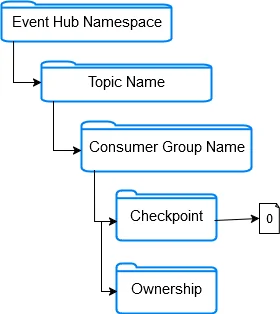
Under the `checkpoint` folder, we have 1 blob per partition containing checkpoint data of the partition.
Under [ownership folder](https://learn.microsoft.com/en-us/azure/event-hubs/event-processor-balance-partition-load#partition-ownership) blobs related to partition-to-client ownership tracking are stored.
If we take a look at the metadata of the blob under `checkpoint`, we can see that it contains 3 fields:
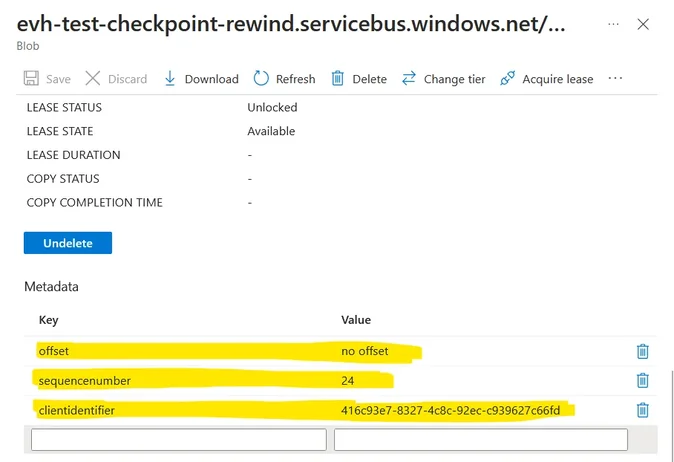
**offset** is a value expressed in bytes indicating where the processing is at in terms of data volume.
Starting from 0 at the beginning of the stream the offset increments by event size in bytes.
If we have events of varying sizes, then the offset will increment with a variable delta each time making it not reliable for rewinding.
**sequencenumber** is a numeric value indicating where the processing is at in terms of sequence number index.
A counter is maintained by the topic for each partition and each event in the partition gets a unique sequence number
per partition.
It always increments by 1 making it reliable for rewinding.
**clientidentifier** is unique value identifying the client that performed the checkpointing.
Note that this value is settable via [`EventProcessorClientOptions.Identifier`](https://learn.microsoft.com/en-us/dotnet/api/azure.messaging.eventhubs.eventprocessorclientoptions.identifier?view=azure-dotnet#azure-messaging-eventhubs-eventprocessorclientoptions-identifier) when creating the consumer client; if
not provided the SDK will use a generated GUID.
### Blob Container Recommendation For Checkpoint Store
It is [recommended to consider](https://learn.microsoft.com/en-us/azure/event-hubs/event-hubs-features#checkpointing) the following aspects of the storage blob used for the checkpoint store:
- Use 1 dedicated blob container per consumer group
- Storage account should be placed in same region as the consumer
- Don't use the storage account for other workloads
- Use [Hot blobs](https://learn.microsoft.com/en-us/azure/storage/blobs/access-tiers-overview#online-access-tiers)
- [Versioning](https://learn.microsoft.com/en-us/azure/storage/blobs/versioning-overview) should be disabled
- [Soft Deletes](https://learn.microsoft.com/en-us/azure/storage/blobs/soft-delete-blob-overview) should be disabled
- [Hierarchical namespace](https://learn.microsoft.com/en-us/azure/storage/blobs/data-lake-storage-namespace) should be disabled
## Checkpoint Cost & Best Practices
Ideally we would call `UpdateCheckpointAsync` as part of the event processing after each event processed.
This would guarantee that on consumer restart, the consumer will pick up the stream exactly where it left and it would avoid to re-process events.
Unfortunately, **updating the checkpoint store has a cost** and it will decrease throughput significantly if we checkpoint with each event processed.
When running the sample on my laptop, calling `UpdateCheckpointAsync` takes around ~150ms:
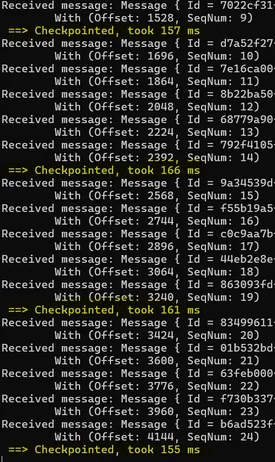
If our sample was running in the same Azure region as the storage account, network latency would be less significant but **still,** it is now accepted as best practice to not checkpoint at each event, consider the following:
```csharp
int checkpointCounter = 0;
int checkpointThreshold = 5;
...
async Task ProcessEventHandler(ProcessEventArgs eventArgs)
{
...
/*
* Update the checkpoint store to mark the event as processed
*/
checkpointCounter += 1;
if (checkpointCounter >= checkpointThreshold)
{
...
await eventArgs.UpdateCheckpointAsync();
...
checkpointCounter = 0;
}
}
```
In our sample, we checkpoint every `checkpointThreshold` events processed. Alternatively, we could also checkpoint every time span.
In any case, deciding of the checkpoint frequency is **context dependent and is a balancing act.**
You will have to ask yourself:
- What is the desired throughput for the system and how often can I break the tempo?
- What is the maximum acceptable count of events we can afford to reprocess?
Checkpoint too frequently, and you'll increase network overhead, decreasing throughput.
Checkpoint too infrequently, and you'll risk reprocessing many events in case of restart.
One final note, [we already discussed previously](https://blog.techdominator.com/article/scaling-azure-event-hubs-event-consumption.html) that event hubs consumers should be **designed to handle events already processed** in the context of the at least once guarantee.
Flexible checkpoints is another reasons to design consumers like so.
## Rewinding the Event Stream for Re-Processing
Rewinding the event stream can be done as part of the [`PartitionInitializingAsync`](https://learn.microsoft.com/en-us/dotnet/api/azure.messaging.eventhubs.eventprocessorclient.partitioninitializingasync?view=azure-dotnet) event.
The `PartitionInitializingAsync` event is called as part of the partition initialization for the consumer client i.e. when the consumer is assigned the partition it is going to draw events from.
Consider the following sequence number based rewind example from the sample:
```csharp
async Task InitializePartitionWithSequenceRewind(PartitionInitializingEventArgs initArgs)
{
...
// Blob Address shortened here
var blobClient = storageClient
.GetBlobClient($".../checkpoint/{initArgs.PartitionId}");
if (blobClient.Exists())
{
var blobProps = await blobClient.GetPropertiesAsync();
long sequenceNumber = Convert.ToInt64(
blobProps
.Value
.Metadata["sequenceNumber"]
);
/*
* Rewind the sequenceNumber by 10 events
*/
long rewindedSequenceNumber = sequenceNumber - 9;
await blobClient.DeleteAsync();
initArgs.DefaultStartingPosition = EventPosition
.FromSequenceNumber(rewindedSequenceNumber);
}
...
}
```
The `InitializePartitionWithSequenceRewind` event handler performs essentially the following:
1. Read the current `sequenceNumber`
2. Calculate a rewinded `sequenceNumber`
3. Delete the blob of the checkpoint store
4. Use the `PartitionInitializingEventArgs.DefaultStartingPosition` property to set the desired starting position
Here the important point to note is that even if it is OK to read from the blob, we should **avoid write fiddling on the blob** and rely instead on the `DefaultStartingPosition` property.
We have 5 options to set `DefaultStartingPosition`:
- [Based on Offset](https://github.com/MissaouiChedy/BlogSamples/blob/main/AzureEventhubsCheckpointsRewinding/AzureEventhubsCheckpointsRewinding/Program.cs#L98)
- [Based on SequenceNumber](https://github.com/MissaouiChedy/BlogSamples/blob/main/AzureEventhubsCheckpointsRewinding/AzureEventhubsCheckpointsRewinding/Program.cs#L124)
- [Based on Event Timestamp](https://github.com/MissaouiChedy/BlogSamples/blob/main/AzureEventhubsCheckpointsRewinding/AzureEventhubsCheckpointsRewinding/Program.cs#L151)
- [From Earliest](https://learn.microsoft.com/en-us/dotnet/api/azure.messaging.eventhubs.consumer.eventposition.earliest?view=azure-dotnet#azure-messaging-eventhubs-consumer-eventposition-earliest)
- [From Latest](https://learn.microsoft.com/en-us/dotnet/api/azure.messaging.eventhubs.consumer.eventposition.latest?view=azure-dotnet#azure-messaging-eventhubs-consumer-eventposition-latest)
It is usually reliable and recommended to base on sequenceNumber or Timestamp since **offset can get unpredictable depending on event size variability.**
## Closing Thoughts
Azure Event Hub is designed for handling high-throughput data ingestion and real-time event streaming.
By using checkpoints, Event Hub offers a reliable way to maintain processing state, enabling consumers to replay events from specific points when needed.
This feature not only ensures data reliability but also supports scenarios like debugging, auditing, or reprocessing historical data.
To sum up:
- Event Hub consumer clients rely on checkpoint store to know where they are at in the vent stream
- Typically, we use storage blob metadata as the checkpoint store
- Checkpoint update is handled by the SDK
- Checkpoint frequency should be considered carefully
- Possible to rewind the checkpoint cursor as part of partition initialization