We will explore in this post the EventHubConsumerClient, another alternative for consuming events intended for basic dev/test and data exploration scenarios.

In a [previous post,](https://blog.techdominator.com/article/consuming-messages-with-azure-event-hubs.html) we explored the typical way of consuming events from Azure Event Hubs by using the [`EventProcessorClient`](https://github.com/Azure/azure-sdk-for-net/blob/main/sdk/eventhub/Azure.Messaging.EventHubs.Processor/samples/Sample04_ProcessingEvents.md) class.
We will explore in this post the [`EventHubConsumerClient`,](https://github.com/Azure/azure-sdk-for-net/blob/main/sdk/eventhub/Azure.Messaging.EventHubs/samples/Sample05_ReadingEvents.md) another alternative for consuming events intended for basic dev/test and data exploration scenarios.
**Full working sample** [is available on Github as usual](https://github.com/MissaouiChedy/BlogSamples/tree/main/AzureEventhubsConsumerClient)
## Alternative Event Consumption for Dev/Test Scenario
The [`EventHubConsumerClient`](https://github.com/Azure/azure-sdk-for-net/blob/main/sdk/eventhub/Azure.Messaging.EventHubs/samples/Sample05_ReadingEvents.md) is straightforward:
1. Start by connecting to an *Event Hub Topic* via a *Consumer Group,*
2. List/select an available partition
3. use [`await foreach`](https://learn.microsoft.com/en-us/archive/msdn-magazine/2019/november/csharp-iterating-with-async-enumerables-in-csharp-8#a-tour-through-async-enumerables) to process events
4. the `await foreach` loop can be stopped via [Cancellation Tokens.](https://www.nilebits.com/blog/2024/06/cancellation-tokens-in-csharp/)
Consider the following snippet from our sample:
```csharp
/*
* 1
*/
var consumer = new EventHubConsumerClient(
"main-consumer",
"evh-test-consumer-client.servicebus.windows.net",
"main-topic",
new DefaultAzureCredential());
...
/*
* 4
*/
using CancellationTokenSource cancellationSource = new CancellationTokenSource();
Console.CancelKeyPress += (sender, e) =>
{
cancellationSource.Cancel();
...
e.Cancel = true;
};
...
/*
* 2
*/
string firstPartition = (await consumer.GetPartitionIdsAsync(cancellationSource.Token))
.First();
EventPosition startingPosition = EventPosition.Earliest;
...
/*
* 3
*/
await foreach (PartitionEvent partitionEvent in consumer.ReadEventsFromPartitionAsync(
firstPartition,
startingPosition,
cancellationSource.Token))
{
...
ReadOnlyMemory eventBodyBytes = partitionEvent.Data.EventBody.ToMemory();
Console.WriteLine($"... Received event ...");
...
}
```
Events will be processed sequentially from the partition as they become available.
Note here that as opposed to `EventProcessorClient`:
- A partition must be explicitly selected for event consumption
- Checkpointing is not handled by `EventHubConsumerClient`
Given the previous constraints, it is actually [not recommended to use `EventHubConsumerClient` for production scenarios](https://devblogs.microsoft.com/azure-sdk/eventhubs-clients/)
since it lacks the following capabilities compared to the `EventProcessorClient`:
- Checkpointing
- Manage reading from several partitions for 1 consumer
- High fault tolerance
## Checkpointing Manually with Redis
Since `EventHubConsumerClient` does not provide an included Checkpoint mechanism, as a developer, you have to implement this yourself if it is required.
In our sample, we implemented checkpoints by using the [Redis in memory key-value store,](https://redis.io/) consider the following snippet:
```csharp
// RedisCheckpointStore.cs
public class RedisCheckpointStore : AbstractCheckpointStore
{
private readonly IDatabase _cache;
private readonly long _ttlSeconds = 3600;
private readonly string _key;
public RedisCheckpointStore(string eventhub, string consumerGroup,
string partitionId, ConnectionMultiplexer connectionMultiplexer)
: base(eventhub, consumerGroup, partitionId)
{
_key = $"{Eventhub}|{ConsumerGroup}|{PartitionId}";
_cache = connectionMultiplexer.GetDatabase();
}
public override async Task GetSequenceNumberAsync()
{
string? sequenceNumberValue = await _cache.StringGetAsync(_key);
if (long.TryParse(sequenceNumberValue, out long sequenceNumber))
{
return sequenceNumber;
}
return -1;
}
public async override Task SetSequenceNumberAsync(long sequenceNumber)
{
await _cache.StringSetAsync(_key, sequenceNumber);
await _cache.KeyExpireAsync(_key, TimeSpan.FromSeconds(_ttlSeconds));
}
}
// Program.cs
...
AbstractCheckpointStore checkpointStore = new RedisCheckpointStore(
consumer.EventHubName,
consumer.ConsumerGroup,
firstPartition,
connectionMultiplexer);
long latestSequenceNumber = await checkpointStore.GetSequenceNumberAsync();
EventPosition startingPosition = EventPosition.Earliest;
if (latestSequenceNumber > 0)
{
startingPosition = EventPosition.FromSequenceNumber(latestSequenceNumber);
}
...
await foreach (PartitionEvent partitionEvent in consumer.ReadEventsFromPartitionAsync(
firstPartition,
startingPosition,
cancellationSource.Token))
{
...
await checkpointStore.SetSequenceNumberAsync(partitionEvent.Data.SequenceNumber);
...
}
```
Here we defined the `RedisCheckpointStore` class, responsible for storing the latest sequenceNumber in Redis.
Redis is a key value store, we create a key in the form of `||` and we store the sequence number as a string value.
Reading and writing values via key is [very fast in Redis.](https://medium.com/@aditimishra_541/why-is-redis-so-fast-despite-being-single-threaded-dc06ba33fc75)
Latest sequence number is read at the beginning of the processing and is recorded with each event processed.
Running this sample from my laptop on an [Azure Cache for Redis](https://learn.microsoft.com/en-us/azure/azure-cache-for-redis/cache-overview) instance produces results that I did not expect 😬:
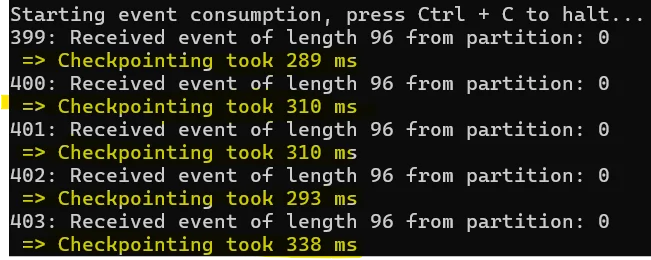
The network latency is such that the checkpoint duration is [similar to the blob storage checkpoint.](https://blog.techdominator.com/article/azure-event-hubs-checkpoints-&-rewinding.html#checkpoint-cost--best-practices)
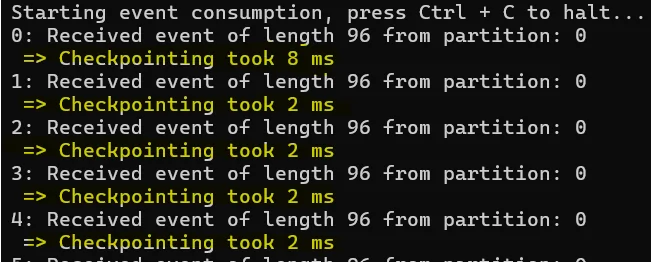
However, checkpointing on a local redis instance is way faster in the order of single digit milliseconds:
## Closing Thoughts
The `EventHubConsumerClient` can be useful for dev/test and data exploration scenarios, however in production better to use the typical `EventProcessorClient.`
Checkpointing in Redis can be fast, but it **brings some data durability challenges for the checkpoint store:**
- What happens if data is evicted from the cache?
- What happens when TTL is expired?
Leading me to think that checkpointing periodically in blob storage with an idempotent event processor is the best approach.