The Partition Receiver is a yet another event consuming alternative available in the Azure Event Hubs .NET SDK.
The [Partition Receiver](https://github.com/Azure/azure-sdk-for-net/blob/main/sdk/eventhub/Azure.Messaging.EventHubs/samples/Sample05_ReadingEvents.md#read-events-from-a-partition-using-the-partitionreceiver) is a yet another event consuming alternative available in the Azure Event Hubs .NET SDK.
From all the options, `PartitionReceiver` is the lowest level of abstraction available before raw AMQP connections.
In this post, we will explore the basic concepts and the main benefits of Partition Receiver.
**Full working sample** [is available on Github as usual](https://github.com/MissaouiChedy/BlogSamples/tree/main/AzureEventHubsPartitionReceiver)
## Principle
Partition receiver enables developers to consume events from a **specific partition** and starting from a **specific position** in the event stream, consider the following snippet from the sample:
```csharp
/*
* 1 - Create an event hubs parition receiver
*/
var receiver = new PartitionReceiver(
consumerGroup,
firstParition,
EventPosition.Earliest,
eventhubNamespace,
eventhubName,
new DefaultAzureCredential()
);
using CancellationTokenSource cancellationSource = new CancellationTokenSource();
...
try
{
/*
* 2 - Read events from the partition while cancellation not requested
*/
while (!cancellationSource.IsCancellationRequested)
{
/*
* 3 - Define Events Batch Size and Pulling Window
*/
int batchSize = 10;
TimeSpan eventPullingSpan = TimeSpan.FromSeconds(1);
/*
* 4 - Perform the actual read from the event stream
*/
IEnumerable eventBatch = await receiver.ReceiveBatchAsync(
batchSize,
eventPullingSpan,
cancellationSource.Token);
foreach (EventData eventData in eventBatch)
{
/* 5 - Process events batch */
...
}
...
}
}
catch (TaskCanceledException)
{
Console.WriteLine("Consumption Canceled !");
}
finally
{
await receiver.CloseAsync();
...
}
```
First, we start by create a `ParitionReceiver` instance, pointing on a specific partition and specific event position in the stream.
We define then a loop in which `ParitionReceiver.ReceiveBatchAsync` is going to be called continuously.
When calling `ParitionReceiver.ReceiveBatchAsync`, we provide a *batch size* and a *pulling timespan*.
`ParitionReceiver.ReceiveBatchAsync` will wait the *pulling timespan* and return a maximum of *batch size* events.
For example, if called with a batch size of 10 and pulling time span of 2 seconds, then it will return maximum of 10 events not yet consumed and available for consumption during the 2 seconds.
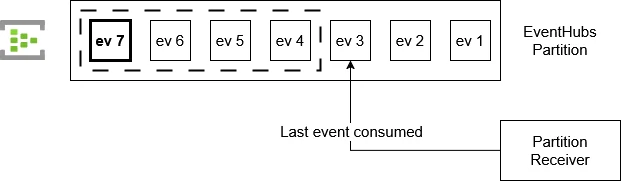
In the previous illustrated example, initially we have ev4, ev5, and ev6 available for pulling.
During the 2 seconds pulling span, ev7 was received, meaning that `ReceiveBatchAsync` will return `[ev4, ev5, ev6, ev7]` as the received batch.
## Benefits
Partition receiver is simple and rudimentary, it allows simply to read from a single partition making it not suitable for most cases.
However, **trading off comprehensiveness,** it still has some benefits that can be useful in some situations.
### Predictability
**Resource usage** mainly in the form of [AMQP](https://learn.microsoft.com/en-us/azure/service-bus-messaging/service-bus-amqp-protocol-guide) links creation is predictable with `PartitionReceiver` since we have exactly 1 AMQP link related to the lifetime of one `PartitionReceiver` instance.
In addition, there is no implicit background pulling managed by the SDK, receiving events is done via an explicit call bringing **network usage** predictability.
`PartitionReceiver` was initially created to [provide a stateful consumer](https://github.com/Azure/azure-sdk-for-net/blob/main/sdk/eventhub/Azure.Messaging.EventHubs/design/proposal-partition-receiver.md) with the previous two properties while encapsulating consumer state composed of:
- Event hubs namespace
- Topic
- Consumer group
- Partition
- Starting position and current position in the partition
### Concurrent Consumers from same partition
In previous posts, we already mentioned that with Event hubs we can't have several consumer clients consuming from the same partition [by design.](https://learn.microsoft.com/en-us/azure/event-hubs/event-processor-balance-partition-load#partition-ownership)
I was surprised 😲 to discover that with `PartitionReceiver`, it was actually possible to have **multiple consumer clients consuming from the same partition** but in different parts of the event stream.
Consider the `AzureEventHubsPartitionReceiver.MultipleReceivers` example from our sample:
```csharp
/*
* Create an event hubs partition receiver
* receiving from latest event in the event stream
*/
var latestReceiver = new PartitionReceiver(
consumerGroup,
firstParition,
EventPosition.Latest,
...
);
/*
* Create an event hubs partition receiver
* receiving from range of events in the event stream
*/
var rangeReceiver = new PartitionReceiver(
consumerGroup,
firstParition,
EventPosition.FromSequenceNumber(500), // starting position
...
);
...
/*
* Launch two receivers concurrently
*/
Task[] tasks = [
Task.Factory.StartNew(() => ReceiveAsync(latestReceiver, cancellationSource).Wait()),
Task.Factory.StartNew(() => ReceiveWithLimitAsync(
rangeReceiver,
cancellationSource,
countLimit: 50)
.Wait()),
];
...
Task.WaitAll(tasks);
```
Here we created two receivers that starts concurrently:
- `latestReceiver` receiving the latest events
- `rangeReceiver` receiving a count of events from a starting sequence number
Taking a look at each corresponding event receiving method:
```csharp
async Task ReceiveAsync(
PartitionReceiver receiver,
CancellationTokenSource cancellationSource)
{
...
try
{
while (!cancellationSource.IsCancellationRequested)
{
int batchSize = 10;
TimeSpan eventPullingSpan = TimeSpan.FromSeconds(1);
IEnumerable eventBatch = await receiver
.ReceiveBatchAsync(
batchSize,
eventPullingSpan,
cancellationSource.Token);
foreach (EventData eventData in eventBatch)
{
...
}
}
}
...
}
async Task ReceiveWithLimitAsync(
PartitionReceiver receiver,
CancellationTokenSource cancellationSource,
int countLimit = 100)
{
...
try
{
/*
* Loop breaks on countLimit
*/
while (!cancellationSource.IsCancellationRequested
&& (eventCount < countLimit))
{
int batchSize = 5;
TimeSpan eventPullingSpan = TimeSpan.FromSeconds(1);
IEnumerable eventBatch = await receiver.ReceiveBatchAsync(
batchSize,
eventPullingSpan,
cancellationSource.Token);
foreach (EventData eventData in eventBatch)
{
...
}
}
...
}
...
}
```
We can see that both receivers are **operating concurrently** but not on the same part of the event stream.
Again, this is not commonly needed but can be useful in some situations.
## Closing Thoughts
While partition receivers is not for most cases, it is still available from specialized and specific requirements,
you can checkout the [design document for some examples.](https://github.com/Azure/azure-sdk-for-net/blob/main/sdk/eventhub/Azure.Messaging.EventHubs/design/proposal-partition-receiver.md#high-level-scenarios)
The .NET SDK offers a comprehensive set of options to produce and consume events, but this leaves me curious about raw AMQP connections 😏