During the last week, I was playing around with some [Phoenix](http://www.phoenixframework.org/) toy projects and I must say that, so far, it is an excellent framework for building reliable and highly concurrent web apis.
I mentioned previously that I am working on a mobile application and that We(the team) decided to use the [elixir/erlang platform](/article/elixir-erlang-platform.html). The mobile application's backend service is highly concurrent in nature and, again so far, Phoenix seems to be a perfect fit for the kind of problems we are trying to address.
In this post, I would like to highlight the routing/controllers aspect of Phoenix.
## plug pipelines
The Phoenix framework is based on [Plug](https://github.com/elixir-lang/plug), I would define Plug as a middleware between web servers and web frameworks.
It essentially allows the developers to create a *pipeline* in which an http request can be shoved upstream passing through the *plugs* (processing steps) of the pipeline, then the processed http request can be passed downstream to a *controller action*.
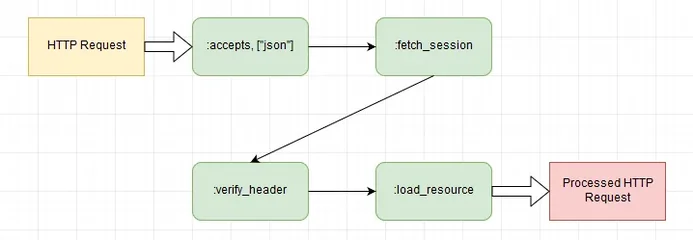
*Pipelines* are composed of *plugs* which can be [simple functions or regular modules](http://www.phoenixframework.org/docs/understanding-plug#section-the-plug-specification). As we can see in the previous flow chart, the steps can be to:
- filter out content types which are not `json`
- fetch the current session
- verify that the http request header contains an authorization token
- load the resource encrypted inside the authorization token
These *pipelines* are defined in the `web/router.ex` file and looks something like this:
We can factor common request processing steps into *pipelines*, which allows us to keep our controller actions concise and on point. In the asp.net core world, the same thing can be achieved by using [*filters*](https://docs.microsoft.com/en-us/aspnet/core/mvc/controllers/filters).
## routes
In the same `web/router.ex` file, we can define *path* to *controller action* mappings(aka *routes*) as follows:
In the previous listing, the `scope` macro is used to define a *scope* composed by a sub-path(`/api`) and usually the application's module (`MyApp`).
We can explicitly choose which defined *pipeline* to use when handling requests routed via a specific *scope*, this enables essentially *pipeline* reuse which is very nice.
In addition, it is possible to define `verb, "/path", Controller, :action_method` routing rules and to create a RESTful resource with the `resources` function given that the controller module [provides conventional methods](http://www.phoenixframework.org/docs/controllers#section-actions) for handling common http verbs, for example the `:show` function is associated to the HTTP `GET` verb by convention.
## controllers
Controllers are actual elixir modules and defined under the `web/controllers` folder with their action methods and looks like this:
Here we defined a `show` action that gets an `id` from the http request create a `User` and then renders the created user in the response via a `json` template (`user.json`).
The `render` function can be used to render html or json templates and there are many more convenience methods that allows to put stuff in the http response, among them:
- [`json`](https://hexdocs.pm/phoenix/Phoenix.Controller.html#json/2) which allows to render a map into a json string
- [`text`](https://hexdocs.pm/phoenix/Phoenix.Controller.html#text/2) which returns a plain text response, can be useful for fiddeling
- [`put_status`](https://hexdocs.pm/plug/Plug.Conn.html#put_status/2) which sets the http response status code
## Conclusion
Many other aspects such as [channels](http://www.phoenixframework.org/docs/channels) and [testing](http://www.phoenixframework.org/docs/introduction) are also very helpful to have in the Phoenix framework, I will maybe talk about them in upcoming post...