In the [previous post](http://blog.techdominator.com/article/considering-an-asp.net-core-reactive-form-tag-helper.html), I articulated the idea of a reactive form tag helper for asp.net core that leverages information in a c# view model class to automatically generate a fully functioning html form.
In this post we are going to mash on a first attempt to implement the *dynamic form tag helper*.
You will notice that I slightly renamed the tag helper. I think that dynamic describes this component better than reactive which can be a misleading hint to [the reactive paradigm](https://gist.github.com/staltz/868e7e9bc2a7b8c1f754).
*Full example available [here](https://github.com/MissaouiChedy/DynamicFormTagHelper)*
## Starting off
In this first attempt we are going to create the `DynamicFormTagHelper`. For the moment it will just handle generating forms for view models that contains exclusively properties that belongs to a what I consider a simple type (`string`, `int`, `DateTime`, `bool`).
The following is the view model class that will be used in the example:
The `DynamicFormTagHelper` will be used as in the following example:
The previous cshtml view, which is strongly typed by the `PersonViewModel` class, contains an occurrence of the `` tag helper. Notice that the view model instance is passed to the tag helper via the `asp-model` attribute.
The responsibility of the `DynamicFormTagHelper` will be to leverage the metadata available in the `PersonViewModel` class in order to generate the following form:
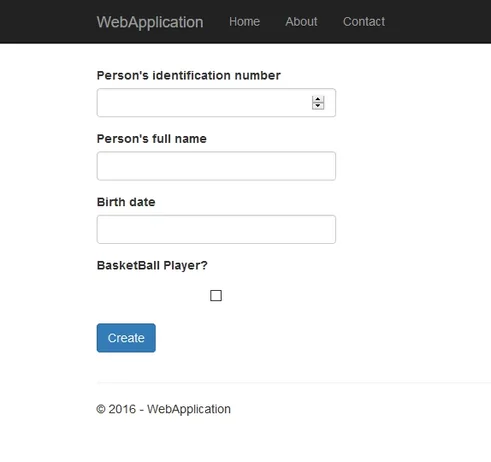
Of course the form will have to handle basic client side form validation (the Id and Name fields are required) and actual posting of the form(in our case to the `/Home/Index` action specified in the `asp-action` attribute).
This example uses the [bootstrap](http://getbootstrap.com/) form styling, if you are not familiar with bootstrap's `form-group` and `form-control` classes you may want [to check them out first](http://getbootstrap.com/css/#forms).
## Form Generation Strategy
The strategy to generate the form is pretty simple: for each property of the view model generate a *form group* containing:
- a `label` element that contains the label of the field
- an `input` element that represents the actual input field
- a `span` element that will act as a validation error placeholder
The resulting *form groups* are then wrapped in a `form` element and a *form group* containing the submit button is added.
The following is the actual `DynamicFormTagHelper` class:
The `DynamicFormTagHelper` requests the injection of the current `ViewContext` as well as of an `IHtmlGenerator` instance. These two objects are needed by the existing tag helpers that we are going to use.
Let's dissect the `DynamicFormTagHelper.ProcessAsync` method:
First a `StringBuilder` instance (`builder`) is created in order to build the form's html markup that will be subsequently generated.
Then the method iterates over the properties of the passed view model object and uses the `FormGroupBuilder.GetFormGroup` method to generate a form group for each **writable** property, each form group's html markup is of course appended to the `StringBuilder`.
Next the submit button form group is appended to the generated markup.
Finally, the `TagHelperOutput` argument is correctly populated with the right tag name (`form`), attributes (`method` and `action`) and content.
## Implementing Form Group Generation
The most interesting behavior, which is the form group generation, is encapsulated in the `FormGroupBuilder.GetFormGroup` static method.
This method leverages the existing `LabelTagHelper`, `InputTagHelper` and `ValidationMessageTagHelper` tag helpers to generate the form group. The `FormGroupBuilder.GetFormGroup` is somewhat complex, let's start analyzing is behavior one layer at a time.
The following listing is the definition of `GetFormGroup`:
Each of the label, input and validation message elements is generated and then wrapped in a div that has the `form-group` class.
`buildLabelHtml`, `buildInputHtml` and `buildValidationMessage` are private static methods that generates the actual html markup, the behavior of these 3 methods is pretty similar.
Let's now see the definition of the `buildLabelHtml` method:
Two simple things are done here:
1. Creating the `LabelTagHelper` instance
2. Calling the `GetGeneratedContent` method with the correct element name, html tag type and the previously created instance
`GetGeneratedContent` executes the tag helper instance it receives as argument and returns the html content generated. Notice here how this method depends upon the `ITagHelper` interface which allows it to handle virtually any possible tag helper.
The following is the definition of `GetGeneratedContent`:
In order to call the `ProcessAsync` method on the passed tag helper instance we have to first create respectively a `TagHelperContext` and a `TagHelperOutput` instance.
`TagHelperOutput`'s constructor takes the following arguments:
- the name of the tag being rendered
- an attribute dictionary representing the html attributes that will be rendered on the generated markup
- an async callback that is going to return the child content of the tag helper
In the current implementation we don't handle eventual child content so we just create a statement lambda that returns empty content.
`TagHelperContext`'s constructor takes the following arguments:
- an attribute dictionary (we use the same as in creating a `TagHelperOutput`)
- A Dictionary that will contain data that will be passed between [nested tag helpers](http://blog.techdominator.com/article/the-very-basics-of-nesting-for-tag-helpers.html).
- a unique string identifier (we use a [Guid](https://en.wikipedia.org/wiki/Universally_unique_identifier) in our implementation)
The created `context` and `output` objects are then used in the `tagHelper.ProcessAsync` call which will populate the `output` object.
Finally, the `renderTag` extension method uses the information in the `output` object to generate the actual html.
The implementation of the `renderTag` method is straight forward, you can inspect it along with the full example in the [github repository](https://github.com/MissaouiChedy/DynamicFormTagHelper).
## Closing Thoughts
This first step looks pretty promising, I invite you to run the example and to try the working client side validation. But some interrogations still remains:
- Are the `TagHelperContext` and `TagHelperOutput` instances created properly?
- Is it necessary to create methods to render the html? Are there no methods already created in the asp.net core framework?
Digging the [asp.net mvc code base](https://github.com/aspnet/Mvc) might help to provide some answers.
In the next post I will try to figure out more stuff and to add complex typed properties handling.