**UPDATE:** *The content of the following post has been revisited with improvements in a [more recent post](http://blog.techdominator.com/article/revisiting-programmatic-tag-helper-rendering.html) check it out.*
***
Lately, I was prototyping around the idea of creating asp.net core tag helper that will basically behave like the [angular 2's dynamic form](https://angular.io/docs/ts/latest/cookbook/dynamic-form.html). The idea is to have a tag helper that generates automatically a form from a C# model class in order to avoid coding the form `cshtml` by hand which can be sometimes tedious and repetitive.
During my fiddling I came across the need to render a tag helper inside the `Process` method of another tag helper.
In this post I wanted to share what I discovered so far, we are going to see a very striped down example of how to implement the aforementioned behavior.
The full code for the example is [available on Github](https://github.com/MissaouiChedy/RenderingTagHelperInsideAnother).
## The Example
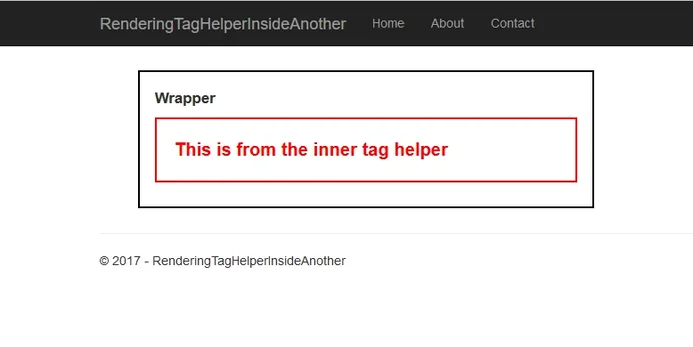
In the previous screenshot the inner html `p` element having a red border is rendered from the `InnerTagHelper`, the outer html div having a black border is rendered from the `WrapperTagHelper`.
The `WrapperTagHelper` renders the `InnerTagHelper` programmatically inside its `Process` method. The following snippet shows how the `WrapperTagHelper` is used:
We can see here that we did not use the `InnerTagHelper` , yet it gets displayed.
### InnerTagHelper
As we can see in the previous code the `InnerTagHelper.Process` method just sets the output html tag to be a `p` element, sets a class attribute for styling purposes and finally fills the content of the paragraph with the `"This is from the inner tag helper"` phrase.
Now let's take a look at the `WrapperTagHelper`.
## Rendering the InnerTagHelper
In order to render a `TagHelper` we need:
- an instance of the `TagHelper` that we wish to render
- an instance of the `TagHelperContext` class
- an instance of the `TagHelperOutput` class
The `TagHelper.Process` method is then called and the result can be accessed in the `TagHelperOutput` instance.
Consider the following snippet from the `WrapperTagHelper`'s code:
The `WrapperTagHelper.Process` method uses the private `renderInnerTagHelper` to get the content generated by the `InnerTagHelper`, let's dissect this method.
First the `InnerTagHelper` class is instantiated, then in order to call the `InnerTagHelper.Process` we need to create a `TagHelperOutput` instance; this is done in the next statement.
The constructor for `TagHelperOutput` needs the following arguments:
- `tagName` which represents the output html tag name, in our case this is set inside `InnerTagHelper.Process` that is why we just pass an empty string.
- `attributes` represents the list of `TagHelperAttribute`s, this list contains the html - attributes accessible from `output.Attributes`, we just pass an empty list in our example since we don't need to pass initial attributes to `InnerTagHelper`
- `getChildContentAsync` is a lambda expression that is supposed to asynchronously return the content of the rendered `TagHelper`, in our example we just pass a lambda expression that returns an empty `TagHelperContent` object since `InnerTagHelper` does not have child content.
Then we call the `InnerTagHelper.Process` method with the `context` and `output` argument. Note that in our example, we used the `TagHelperContext` passed to `WrapperTagHelper.Process` by the asp.net core machinery.
Finally, after calling `Process` `output` will be populated with the generated content. All we have to do now is to generate the actual Html tag before returning it.
## Closing Thoughts
After a little a bit of experimentation, I still have some interrogations worth considering:
- Is it OK to use the `context` instance? Or should a new instance be created? perhaps a copy?
- How to create a `getChildContentAsync` lambda in order to generate child content?
I will of course share the answers as soon as I get the interrogations figured out :-)