
Azure Event Hubs Kafka Surface
Demonstration of how to use the Event Hubs Kafka protocol surface for sending/receiving events, rewinding stream and passwordless authentication
UPDATE, 07 Sep 2026 — Corrected reference to EventProcessorClient which was wrongly referred to as EventConsumerClient
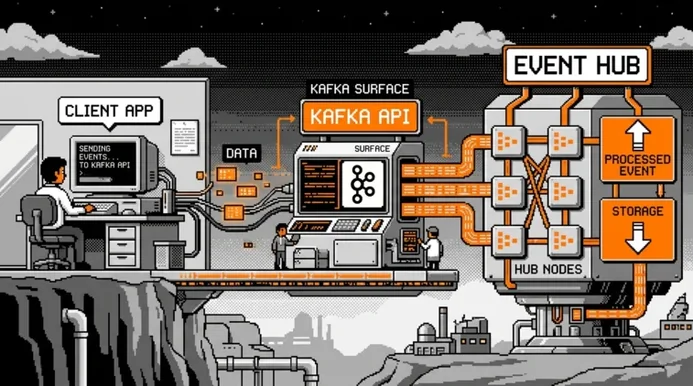
Azure Event Hubs exposes a Kafka protocol surface that allows Kafka clients to connect to an Event Hubs namespace without any changes to the broker infrastructure. This feature is available starting from the Standard tier and supports Kafka version 1.0 and later.
When I first read about this, my initial reaction was: what for? Event Hubs already has a capable SDK, so why bother with a Kafka compatibility layer? It turns out there are some compelling use cases, which we will get into shortly.
In our sample, we use the Confluent.Kafka NuGet package to interact with Event Hubs over the Kafka protocol from C#. The sample covers producing events, consuming them with explicit checkpointing, and rewinding the stream.
Full working sample is available on Github as usual
Why Kafka Surface and What Features Are Available ?
The Kafka surface is primarily useful in two situations.
The first is easing migrations from on-premises Kafka to Event Hubs. If a team already runs a Kafka-based system and wants to move to a managed cloud service, the Kafka surface lets existing producers and consumers connect to Event Hubs without rewriting client code.
The migration can be incremental: swap the bootstrap server address, configure authentication, and the rest of the application stays (hopefully) untouched.
The second is leveraging the Kafka ecosystem tooling. Teams that already use Kafka-native tools such as Kafka Streams, Kafka Connect, or monitoring integrations built around the Kafka protocol can continue using them against Event Hubs.
This is valuable when those tools are already well-understood and embedded in existing workflows.
Importantly, using the Kafka surface does not mean giving up Event Hubs capabilities. Features such as Event Hubs Capture, Auto-Inflate, Geo-Disaster Recovery, and native Azure integrations remain fully available on the namespace side.
In terms of additional Kafka-specific features, the following are worth noting:
- Transactions (public preview, Premium and Dedicated tiers only)
- Kafka Streams (public preview, Premium and Dedicated tiers only)
- Compression (Premium and Dedicated tiers only)
Standard tier users get the core produce and consume capabilities, which covers the majority of use cases.
Kafka Surface Entra ID Authentication
Kafka client applications traditionally uses shared secrets such as API keys or SASL/PLAIN credentials.
With the Event Hubs Kafka surface, there is no need to compromise on passwordless, secretless authentication. It is possible to authenticate using OAuth 2.0 bearer tokens over SASL OAUTHBEARER, which integrates cleanly with Microsoft Entra ID.
SASL (Simple Authentication and Security Layer, RFC 4422) separates authentication from application protocols and defines how a Kafka client and broker authenticate at connection time.
With SASL, clients register a token-refresh callback to supply credentials, and the OAUTHBEARER mechanism uses that callback to deliver OAuth bearer tokens.
With the Confluent.Kafka library this is done via a token refresh callback that the client invokes whenever a new token is needed.
In our sample, this callback uses DefaultAzureCredential from the Azure Identity library to acquire a token for the Event Hubs scope:
1
2
3
4
5
6
7
8
9
10
11
12
13
14
15
16
17
18
19
20
21
22
23
24
25
26
27
28
string BootstrapServers = "evh-test-kafka-surface.servicebus.windows.net:9093";
string TopicName        = "main-topic";
string ConsumerGroup    = "main-consumer";
string EventHubsScope   = "https://evh-test-kafka-surface.servicebus.windows.net/.default";

var credential = new DefaultAzureCredential();

/*
 * Define the SASL Oauth refresh handler.
 */
Action<IClient, string> oauthRefreshHandler = (client, _) =>
{
    try
    {
        var tokenRequestContext = new TokenRequestContext([EventHubsScope]);
        var accessToken = credential.GetToken(tokenRequestContext);

        client.OAuthBearerSetToken(
            tokenValue:    accessToken.Token,
            lifetimeMs:    accessToken.ExpiresOn.ToUnixTimeMilliseconds(),
            principalName: string.Empty,
            extensions:    new Dictionary<string, string>());
    }
    catch (Exception ex)
    {
        client.OAuthBearerSetTokenFailure(ex.ToString());
    }
};
The handler is called by the client library before the current token expires:
- On success,
OAuthBearerSetTokenis called with the token value and its expiration time in milliseconds. - On failure,
OAuthBearerSetTokenFailureis called with an error description, which allows the library to retry.
Note how we used the DefaultAzureCredential object to get the effective token available via az cli authentication in our example.
The same handler instance is shared between producer and consumer, since the token acquisition logic is identical.
Sending Events via Kafka Surface
The Confluent.Kafka library represents a producer via the IProducer<TKey, TValue> interface, built using the ProducerBuilder.
In our sample, we send events with a random GUID as the partition key at a configurable interval, which acts as a real producer sending events to a topic. Producing events is pretty similar to what we night have with vanilla Event Hubs.
The producer configuration sets the security protocol to SaslSsl and the SASL mechanism to OAuthBearer, and then wires up the token refresh handler:
1
2
3
4
5
6
7
8
9
10
11
12
13
14
15
16
17
18
19
20
21
22
23
24
25
26
27
28
29
30
31
32
33
34
35
36
37
38
39
40
41
42
43
44
45
46
47
48
49
50
public class KafkaProducer
{
    ...

    public async Task RunAsync(CancellationToken cancellationToken)
    {
        /*
         * Create Kafka Producer configuration with SASL OAUTHBEARER settings.
         */
        var config = new ProducerConfig
        {
            BootstrapServers      = _bootstrapServers,
            SecurityProtocol      = SecurityProtocol.SaslSsl,
            SaslMechanism         = SaslMechanism.OAuthBearer,
            SaslOauthbearerMethod = SaslOauthbearerMethod.Default,
        };

        using var producer = new ProducerBuilder<string, string>(config)
            .SetOAuthBearerTokenRefreshHandler(_oauthRefreshHandler)
            .Build();

        Console.WriteLine("[Producer] Started.");

        /*
         * While Cancellation not requested, produce messages at regular interval.
         */
        while (!cancellationToken.IsCancellationRequested)
        {
            try
            {
                var message = new Message<string, string>
                {
                    Key   = Guid.NewGuid().ToString(), // Partition Key
                    Value = $"Message from Kafka over Event Hubs ...",

                };

                var delivery = await producer
                    .ProduceAsync(_topicName, message, cancellationToken);
                ...

                await Task.Delay(_sendInterval, cancellationToken);
            }
            ...
        }

        producer.Flush(TimeSpan.FromSeconds(5));
        Console.WriteLine("[Producer] Stopped.");
    }
}
The message Key acts as the partition key: the Kafka protocol hashes it to determine which partition the event is routed to. Using a random GUID per message distributes events roughly evenly across partitions; this mechanism is honored by Event Hubs.
After the send loop exits, producer.Flush is called to ensure any buffered messages are delivered before the producer is disposed. Without this call, in-flight messages could be silently dropped on shutdown.
Event Consumption
Receiving Events and Checkpointing
Event consumption in Kafka works via polling: the consumer calls Consume repeatedly to fetch the next available event from its assigned partitions. This is conceptually similar to how the Event Hubs SDK works with EventProcessorClient, though the API surface differs.
With Confluent.Kafka a loop should be explicitly defined as opposed to the Event Hubs SDK’s EventProcessorClient which exposes events to register handling callbacks.
Checkpointing in Kafka is handled by committing offsets back to the broker, which tracks the consumer group’s position per partition.
No Azure Storage account is required for this: offsets are stored server-side by Event Hubs itself when using the Kafka surface. This is convenient, but it also means the checkpoint store is opaque and not directly accessible; we will come back to this in the limitations section.
In our sample, we set EnableAutoCommit = false to manage checkpoints explicitly, which gives us control over when a processed event’s offset is committed:
1
2
3
4
5
6
7
8
9
10
11
12
13
14
15
16
17
18
19
20
21
22
23
24
25
26
27
28
29
30
31
32
33
34
35
36
37
38
39
40
41
42
43
44
45
46
47
48
49
50
51
52
53
54
55
56
57
public class KafkaConsumer
{
    ...
    public Task RunAsync(CancellationToken cancellationToken)
    {
        var config = new ConsumerConfig
        {
            BootstrapServers = _bootstrapServers,
            SecurityProtocol = SecurityProtocol.SaslSsl,
            SaslMechanism    = SaslMechanism.OAuthBearer,
            GroupId          = _consumerGroup,
            AutoOffsetReset  = AutoOffsetReset.Earliest,
            EnableAutoCommit = false, // Explicit offset management i.e. checkpointing
        };

        /*
         * CancellationToken.None is used here so the task is always scheduled.
         * Cancellation is handled inside the loop so that consumer.Close()
         * always runs.
         */
        return Task.Run(() =>
        {
            using var consumer = new ConsumerBuilder<string, string>(config)
                .SetOAuthBearerTokenRefreshHandler(_oauthRefreshHandler)
                .Build();

            consumer.Subscribe(_topicName);
            ...
            while (!cancellationToken.IsCancellationRequested)
            {
                try
                {
                    ...
                    /*
                     * Poll for available events with a relatively short timeout.
                     */
                    var result = consumer.Consume(TimeSpan.FromMilliseconds(800));
                    if (result is null)
                        continue;

                    // Process Event
                    Console.WriteLine(...);

                    /*
                     * Checkpoint the offset of the event processed.
                     */
                    consumer.Commit(result);
                }
                ...
            }

            consumer.Close();
            ...
        }, CancellationToken.None);
    }
    ...
}
A few details worth noting here. The AutoOffsetReset = AutoOffsetReset.Earliest setting tells the consumer to start from the beginning of the topic when no committed offset exists for the consumer group. This is the equivalent of starting from the earliest available event in Event Hubs terms.
The consume loop runs inside Task.Run with CancellationToken.None to ensure the task is always scheduled and, critically, that consumer.Close() is always called. Cancellation is checked inside the loop, not at the task scheduling level. Calling consumer.Close() is important because it sends a leave-group request to the broker, allowing partition reassignment to happen promptly rather than waiting for a session timeout.
After processing each event, consumer.Commit(result) records the offset to the broker. Like in the Event Hubs SDK, committing after every single event can be expensive depending on throughput requirements; batching commits to every N events is a common optimization.
Rewinding Checkpoint
Replaying events from an earlier point in the stream is a common need, whether for reprocessing after a bug fix or for debugging.
In the Kafka API, this is done via consumer.Seek, which repositions the consumer to a specific offset on a given partition.
This is analogous to using EventPosition.FromSequenceNumber in the Event Hubs SDK, though the mechanism differs: the Kafka surface seek happens at runtime within a running consumer, while the Event Hubs SDK rewind is typically configured during partition initialization.
In our sample, a rewind to the beginning of all assigned partitions can be requested from outside the consume loop via a flag, triggered by pressing the ‘r’ key in the main console program:
1
2
3
4
5
6
7
8
9
10
11
12
13
14
15
16
17
18
19
20
21
22
23
24
25
26
27
28
29
30
31
32
33
34
35
36
37
38
39
40
41
42
43
44
45
46
47
48
49
50
51
52
53
54
55
56
57
58
59
60
61
62
63
64
65
66
67
68
69
70
71
72
73
74
public class KafkaConsumer
{
    ...
    private volatile bool _rewindRequested;
    ...
    /*
     * Signal that a rewind to the beginning of the topic
     *  should be performed before the next Consume call.
     */
    public void RequestRewind() => _rewindRequested = true;

    public Task RunAsync(CancellationToken cancellationToken)
    {
        ...
        /*
         * CancellationToken.None is used here so the task is always scheduled.
         * Cancellation is handled inside the loop so that consumer.Close()
         * always runs.
         */
        return Task.Run(() =>
        {
            using var consumer = new ConsumerBuilder<string, string>(config)
                .SetOAuthBearerTokenRefreshHandler(_oauthRefreshHandler)
                .Build();
            ...
            while (!cancellationToken.IsCancellationRequested)
            {
                try
                {
                    /*
                     * Handle a pending rewind before the next Consume call.
                     */
                    HandleStreamRewind(consumer);

                    ...
                }
                ...
            }

            consumer.Close();
            Console.WriteLine("[Consumer] Stopped.");
        }, CancellationToken.None);
    }

    /*
     * If a rewind is requested, seek all assigned partitions back to the beginning.
     */
    private void HandleStreamRewind(IConsumer<string, string> consumer)
    {
        if (!_rewindRequested) return;

        _rewindRequested = false;

        List<TopicPartition> assignedPartitions = consumer.Assignment;

        if (assignedPartitions.Count > 0)
        {
            foreach (var topicPartition in assignedPartitions)
            {
                /*
                 * Perform a Seek to the beginning of each assigned partition.
                 */
                consumer.Seek(
                    new TopicPartitionOffset(
                        topicPartition.Topic,
                        topicPartition.Partition,
                        Offset.Beginning)
                    );
            }
            ...
        }
        ...
    }
}
_rewindRequested is declared volatile because it is written from an external thread and read inside the consume loop thread; the volatile keyword ensures the write is visible across threads without requiring a lock.
The HandleStreamRewind method is called at the top of each loop iteration, before the next Consume call. It reads the list of partitions currently assigned to this consumer, then calls Seek on each one with Offset.Beginning. After the seek, the next Consume call will return events from the beginning of each partition, effectively replaying the entire stream.
Kafka Surface Limitations
The Kafka surface is a useful compatibility layer, but it is worth being clear-eyed about what it is not: a full, unrestricted Kafka deployment.
Kafka-specific advanced features are limited by tier. Transactions and Kafka Streams are currently in public preview and only available on Premium and Dedicated tiers. In general, the semantics of these features may vary slightly from a self-managed Kafka cluster due to the differences in the underlying broker implementation.
As a managed cloud service, Event Hubs is subject to throughput throttling and quota limits. Kafka batch produce semantics and high-throughput patterns that work well against a dedicated Kafka cluster may behave differently when hitting Event Hubs quota boundaries.
Topic and partition management cannot be done through the Kafka API. Creating or deleting topics, changing partition counts, and similar administrative operations must go through the Azure control plane, whether that is the Azure portal, the Azure CLI, or ARM templates. Tooling that assumes it can manage topic lifecycle via the Kafka Admin API will not work as expected.
The checkpoint store is opaque. When using the Kafka protocol, committed offsets are stored inside the Event Hubs infrastructure. Unlike the Event Hubs SDK where you supply an explicit BlobCheckpointStore and can inspect, manipulate and customize the checkpoint store directly.
SASL authentication is limited to OAUTHBEARER and shared access signature (SAS) policies. Other SASL mechanisms such as PLAIN with custom credentials are not supported. For most Azure-native workloads this is not a constraint, since Entra ID OAuth tokens and SAS policies cover the common cases, but it is a consideration when integrating with third-party tooling that assumes specific SASL mechanisms.
The general principle here is that this kind of protocol compatibility abstraction always comes with some ceiling on capability.
Before committing to the Kafka surface for a complex use case, it is worth testing the specific Kafka behaviors your application relies on against Event Hubs, rather than assuming full parity with a native Kafka cluster.
Closing Thoughts
Azure Event Hubs has matured into a solid, versatile event streaming service, and the Kafka protocol surface is a good example of the pragmatism that has shaped it.
Rather than asking teams to abandon existing Kafka knowledge and tooling, the surface lets them reuse what they have while moving to a managed platform with strong Azure integration.